
Understanding Multi-Agent Communication: The Three Protocols You Actually Need
How MCP, A2A, and AG-UI solve different coordination challenges and why production systems need all three working together...

Multi-agent systems are replacing single-agent architectures across AI applications. A customer support system coordinates classification agents, retrieval agents, response generators, and quality checkers. A research assistant delegates between search specialists, analysis experts, and synthesis coordinators.
But coordination creates complexity. How does an agent discover what tools exist? How does one agent request help from another without pre-programmed workflows? How do humans monitor agent decisions in real-time?
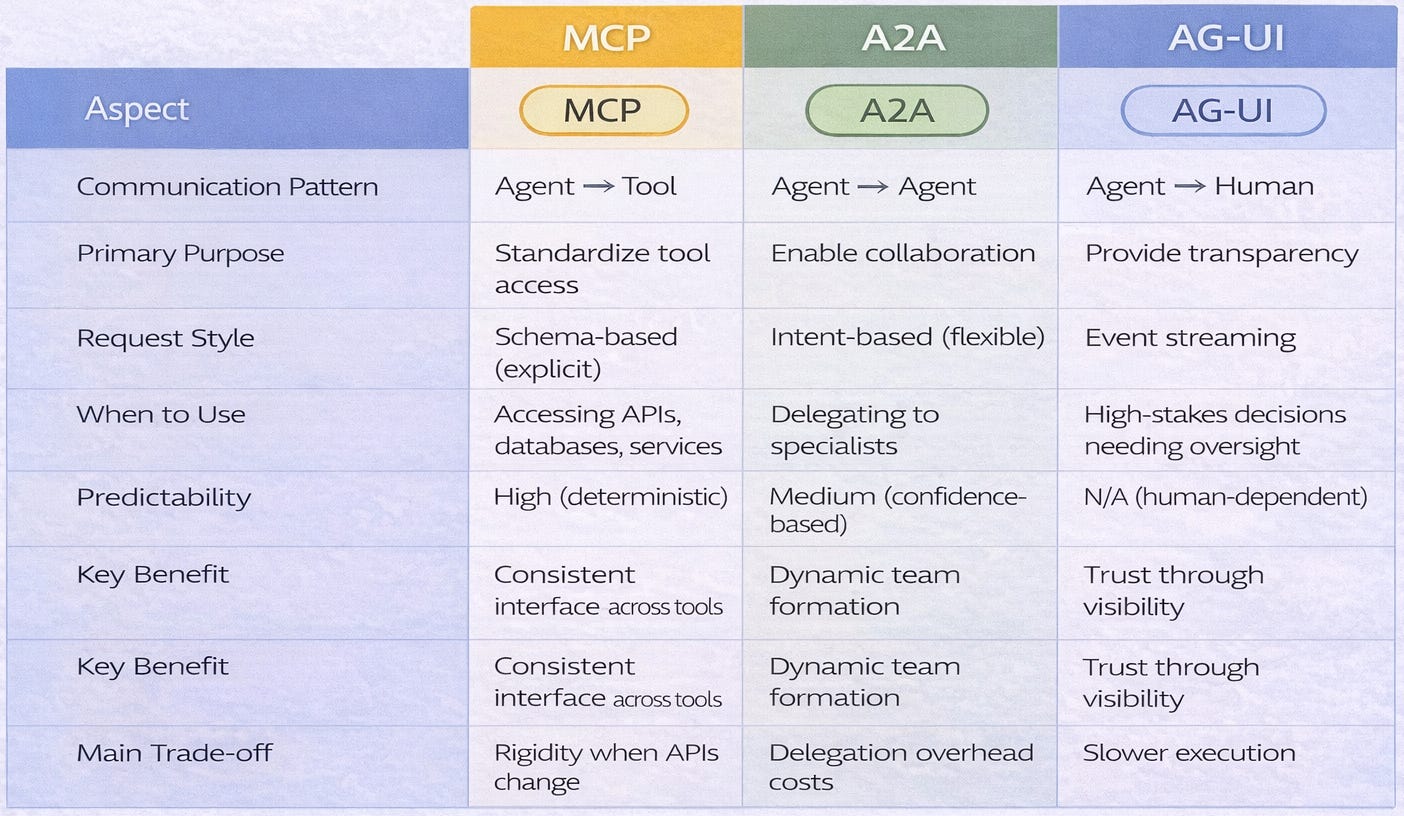
Three core protocols have emerged to solve these challenges: Model Context Protocol (MCP) standardises tool access, Agent-to-Agent (A2A) enables agent collaboration, and Agent-User Interface (AG-UI) provides human oversight.
This article explains what each protocol does, when to use it, and how they work together. No vendor marketing. No protocol wars. Just clear architectural guidance.
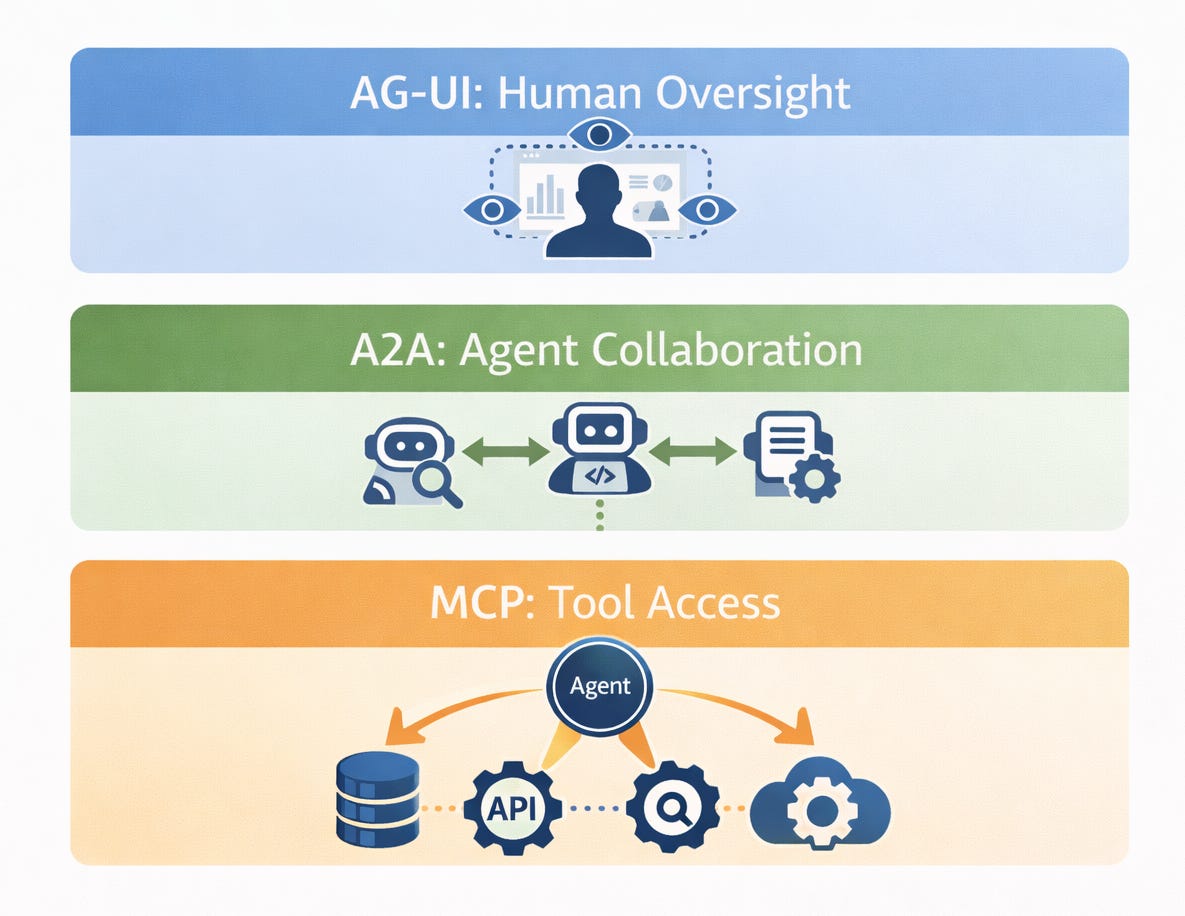
The Three Communication Patterns Framework
Multi-agent systems face three fundamentally different communication challenges, each requiring distinct protocol approaches.
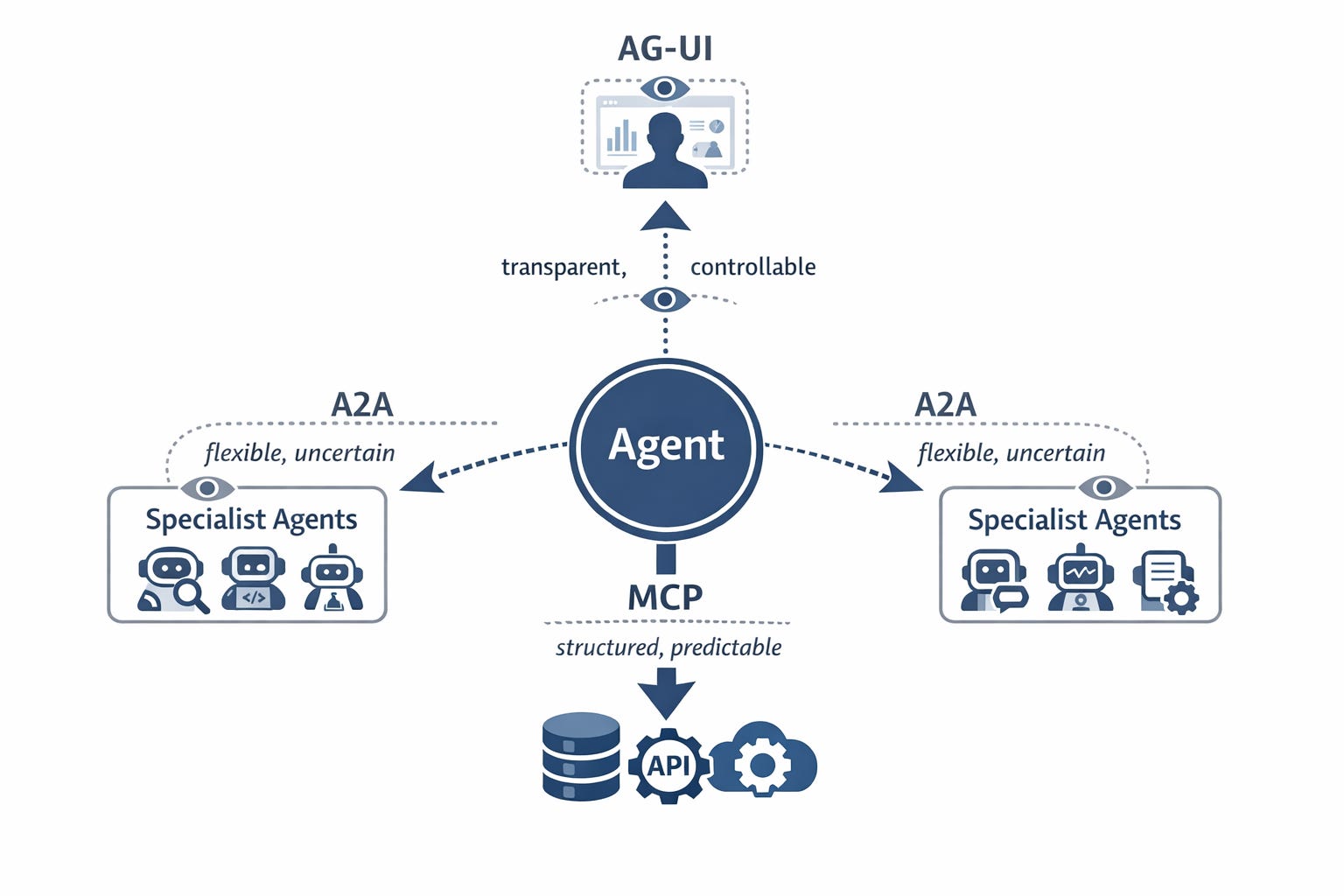
Pattern 1: Agent-to-Tool Communication
The Need → Agents must access external capabilities like databases, APIs, and services to accomplish tasks.
The Challenge → Different tools have different interfaces, authentication methods, and data formats. An agent calling a calendar API uses different code than one calling a payment processor. This fragmentation makes integration expensive and brittle.
The Solution Space → A standardized tool access layer that wraps diverse APIs behind a common interface.
Pattern 2: Agent-to-Agent Communication
The Need → Agents must delegate tasks, share information, and coordinate workflows with other specialized agents.
The Challenge → Agents have different specializations, uncertain capabilities, and varying availability. A coordinator doesn’t always know which specialist can handle a given task or whether that specialist is ready to receive work.
The Solution Space → Flexible intent-based delegation that allows agents to discover collaborators and communicate goals without rigid pre-programmed workflows.
Pattern 3: Agent-to-Human Communication
The Need → Humans need transparency, oversight capabilities, intervention points, and trust-building visibility into agent operations.
The Challenge → Agents run long-running processes and make non-deterministic decisions. Without visibility, humans can’t catch errors before they cascade or verify that agents are acting appropriately.
The Solution Space → Event streaming and control surfaces that make agent activities transparent and provide strategic intervention points.
Why These Patterns Are Distinct
Tools are predictable, deterministic, and schema-defined. You call a database with a query, it returns results. The behavior is consistent.
Agents are adaptive, non-deterministic, and capability-discovering. You ask an analysis agent for insights, it might use different methods each time. The approach varies based on context.
Humans need visibility, not just results. Knowing an agent completed a task isn’t enough you need to understand how it made decisions and whether those decisions align with your intent.
Architectural Implications
Different protocols optimize for different communication patterns. Trying to use one protocol for all patterns create inefficiency. A tool-access protocol designed for rigid schemas won’t handle the flexibility agents need to collaborate. A delegation protocol optimized for uncertainty won’t provide the structured interfaces tools require.
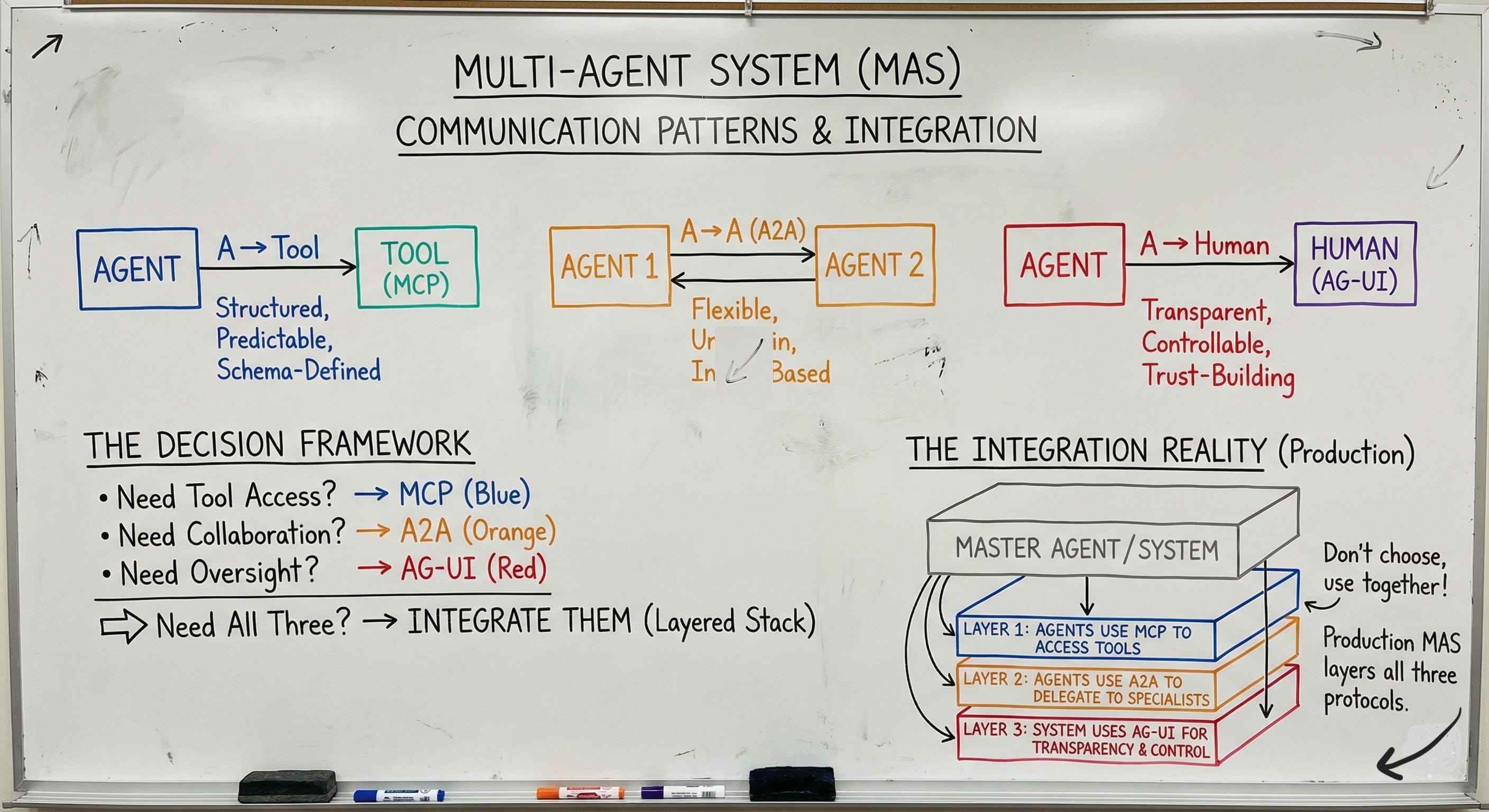
Modern multi-agent systems need all three layers working together.
Consider This: When your agent needs market data, it uses a different communication style to query a database (tool) than to request analysis from a specialist agent (collaborator) than to ask permission from a human (oversight). Each pattern has distinct requirements.
Model Context Protocol (MCP): Standardizing Tool Access
MCP solves the fragmented tooling problem by providing a universal interface for agents to discover and use external capabilities.
Core Components
1. MCP Servers: Wrap existing tools and APIs with a standardized interface. Each server acts as a translator between MCP’s common format and the underlying tool’s native format.
2. MCP Clients: Agents that can discover and call MCP servers using the standardized protocol.
3. Resource Schema: Structured definitions declaring what each tool does, what inputs it accepts, and what outputs it returns.
4. Tool Registry: A discoverable catalog of available capabilities where MCP servers register and advertise their functions.
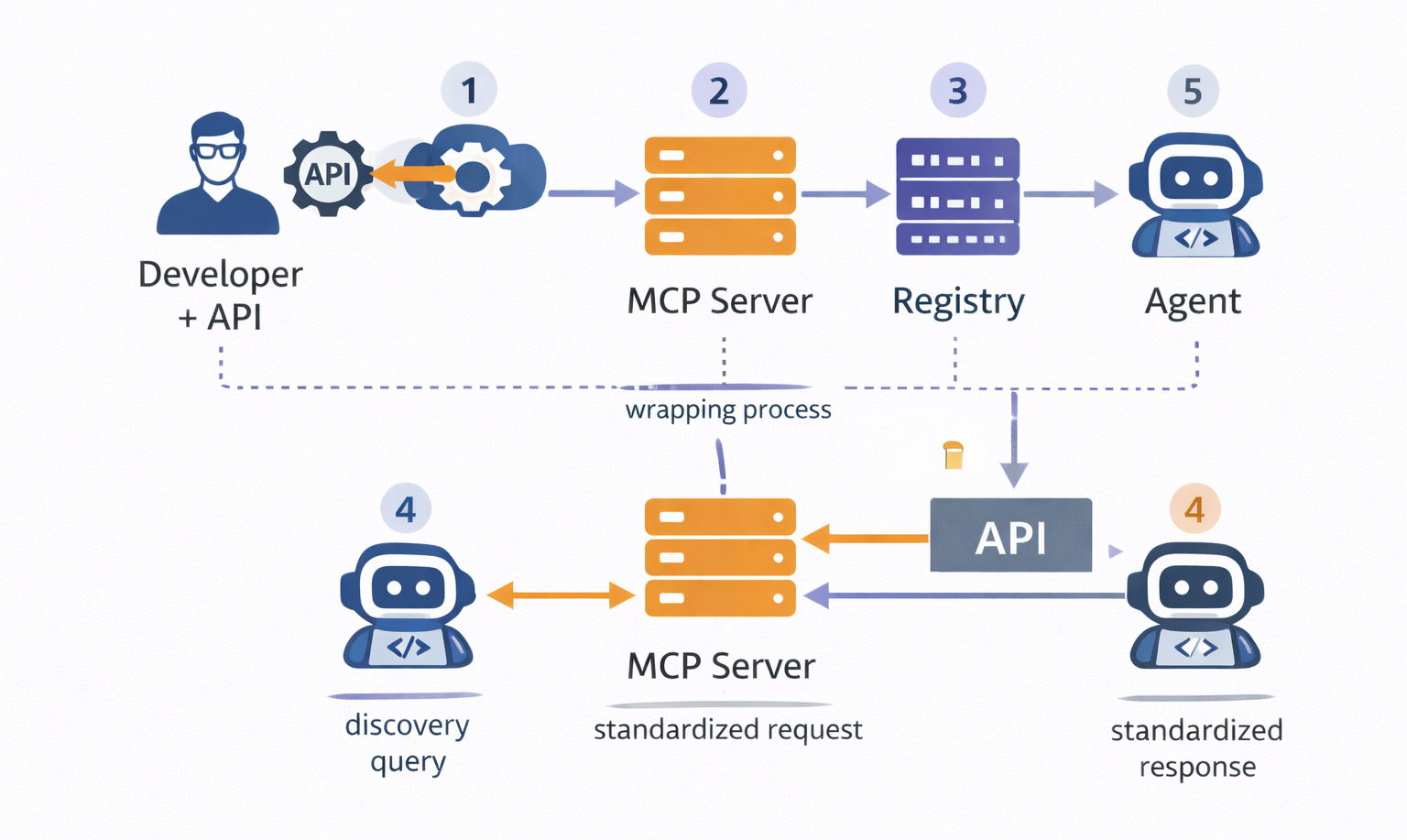
How It Works
Step 1 - Server Registration: A developer wraps an API in an MCP server, defining input and output schemas. The server registers with the MCP registry, advertising its capabilities.
Step 2 - Agent Discovery: An agent queries the registry to find available tools. The registry returns matching tools based on capability descriptions.
Step 3 - Standardized Request: The agent calls the tool using MCP’s common format, regardless of the underlying API’s native interface.
Step 4 - Translation & Execution: The MCP server translates the standardized request into the API’s native format, executes the call, and receives the result.
Step 5 - Standardized Response: The server converts the API response into MCP’s common format and returns it to the agent.
Key Design Principles
Explicit Schemas: Every tool declares inputs and outputs in structured format. A calendar API declares it accepts a date range and returns a list of events with timestamps.
Standardized Errors: Common error codes across all tools. Connection timeouts, authentication failures, and rate limits all map to standardized codes agents can handle uniformly.
Stateless Interactions: Each call is independent with no session management required. The agent doesn’t maintain connection state between calls.
Type Safety: Strong typing prevents malformed requests. The schema enforces that date fields contain dates, not strings or numbers.
What Problems MCP Solves
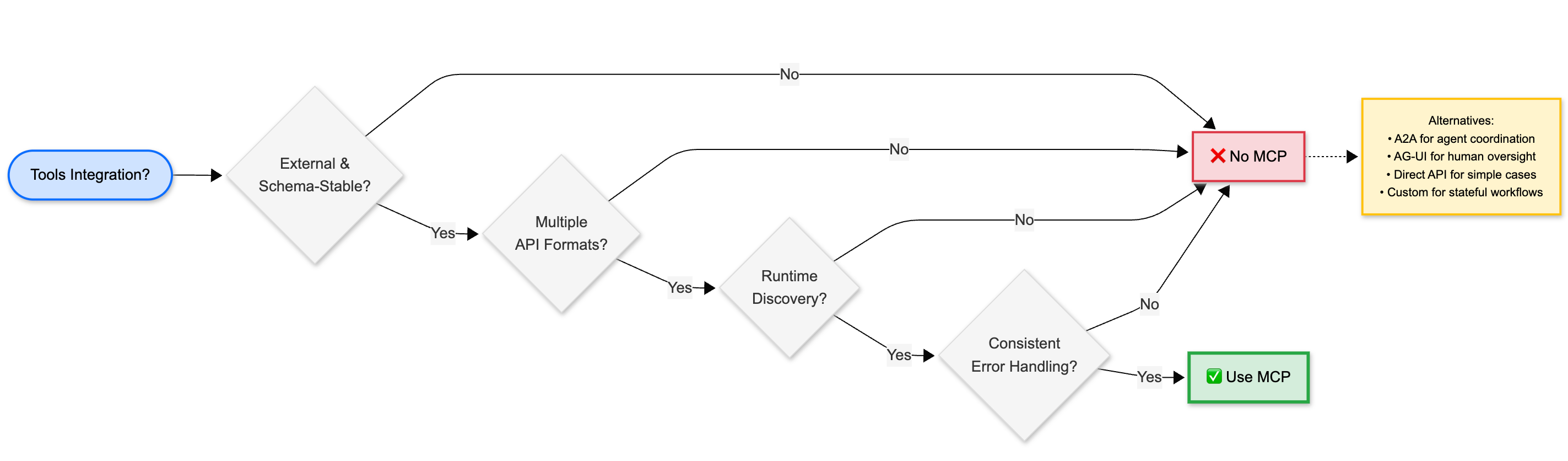
MCP eliminates custom integration code for each tool. Instead of writing specific API clients for every service, agents use one standardized MCP client.
It provides consistent error handling across different APIs. Every tool returns errors in the same format with the same codes.
It enables runtime tool discovery. Agents can find new capabilities dynamically without code changes.
It reduces maintenance burden when APIs change. Update the MCP server wrapper, not the agent code.
What MCP Doesn’t Solve
MCP doesn’t handle agent-to-agent coordination. It’s designed for agents calling tools, not agents calling other agents.
It doesn’t provide human oversight mechanisms. MCP operates transparently to users there’s no built-in visibility layer.
It doesn’t manage complex multi-step workflows. MCP handles individual tool calls, not orchestration across multiple tools.
It doesn’t handle context sharing between related calls. Each MCP call is stateless and independent.
Use Case Example
A customer support agent needs to:
Query the ticket database (MCP server:
ticket_system)Fetch customer history (MCP server:
crm_api)Search the knowledge base (MCP server:
docs_search)
Without MCP: The agent needs custom code for three different APIs; one might use REST, another GraphQL, another SOAP. Each has different authentication, error handling, and data formats.
With MCP: The agent makes three standardized MCP calls. The MCP servers handle translation to each API’s native format. The agent receives consistent responses regardless of underlying differences.
Agent-to-Agent (A2A) Protocol: Enabling Flexible Delegation
A2A enables agents to collaborate dynamically without pre-programmed workflows by using intent-based communication.
Core Components
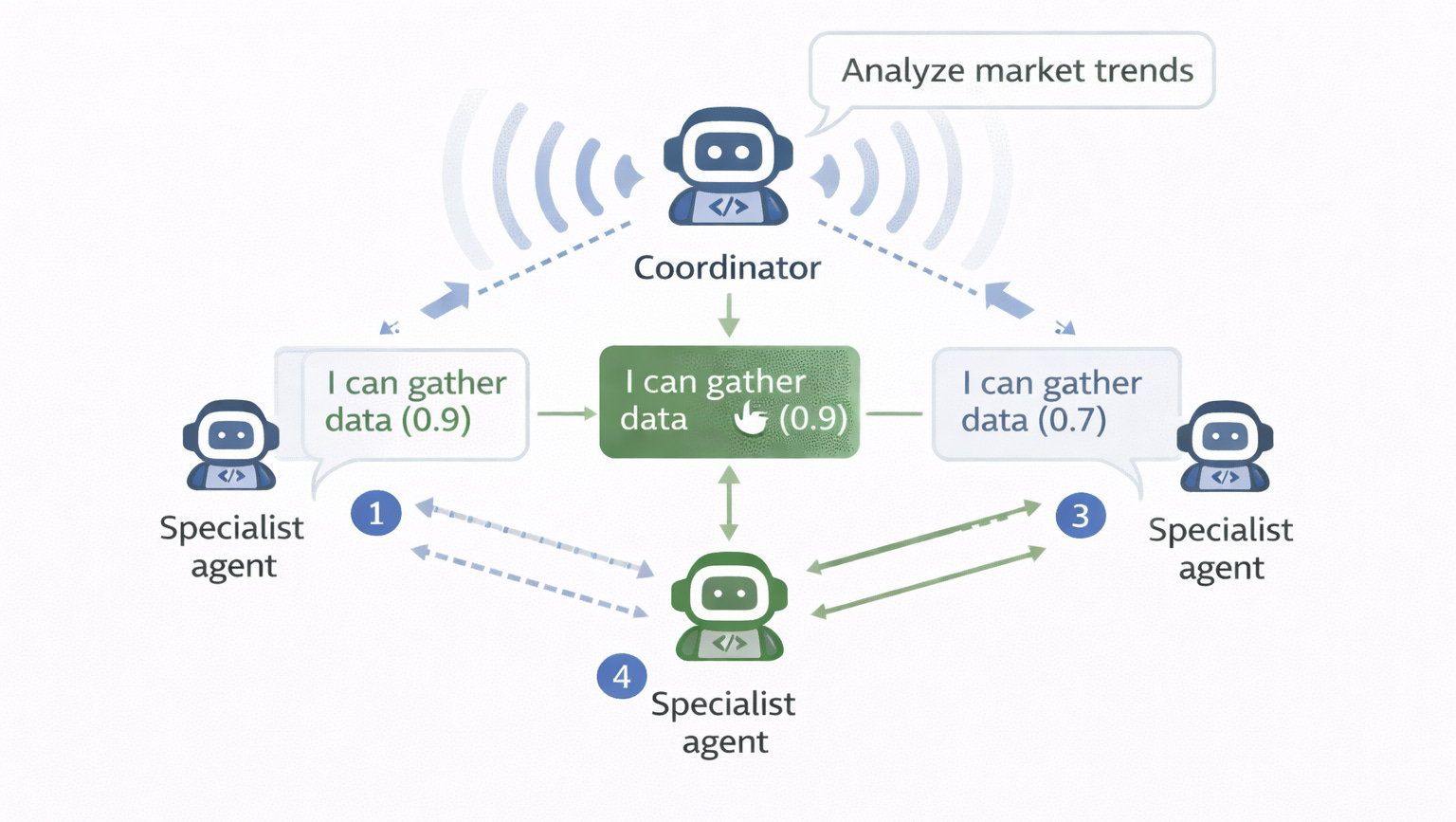
1. Capability Broadcasting: Agents advertise what they can do, including confidence levels and current availability.
2. Intent Messages: High-level task requests that describe desired outcomes without specifying implementation details.
3. Negotiation Layer: Agents confirm understanding before executing, allowing them to clarify ambiguous requests.
4. Result Streaming: Progressive updates as work completes, rather than waiting for final results.
How It Works
Step 1: A coordinator agent has a high-level goal (the intent).
Step 2: The coordinator broadcasts the intent to available specialist agents.
Step 3: Specialists respond with capability match scores and confidence levels.
Step 4: The coordinator selects a specialist based on match quality and confidence.
Step 5: The selected specialist executes the task, streaming progress updates.
Step 6: The coordinator receives results and either integrates them or delegates further to other specialists.
Key Design Principles
Intent Over Instructions: Agents communicate “what” they want accomplished, not “how” to accomplish it. The coordinator says “analyze market trends,” not “run regression on dataset X with parameters Y.”
Capability Discovery: Agents find collaborators at runtime based on advertised capabilities, not hard-coded references.
Loose Coupling: No hard-coded agent dependencies. The coordinator doesn’t need to know which specific agents exist—only what capabilities it needs.
Progressive Disclosure: Results stream as they’re generated rather than arriving all at once. This allows coordinators to act on partial results or cancel unnecessary work.
What Problems A2A Solves
A2A eliminates rigid workflow definitions. Agents adapt to available specialists rather than following fixed execution paths.
It enables dynamic team formation. Different specialists handle different tasks based on current availability and capability match.
It handles uncertain capabilities. Confidence scoring guides specialist selection when multiple agents could handle a task.
It supports parallel delegation. Multiple specialists can work simultaneously on different subtasks.
What A2A Doesn’t Solve
A2A doesn’t standardize tool access. That’s MCP’s responsibility. A2A is for agent-to-agent coordination.
It doesn’t provide human transparency. That’s AG-UI’s role. A2A operates between agents without inherent visibility to users.
It doesn’t prevent delegation loops. Without circuit breaker logic, agents can recursively delegate tasks back and forth.
It doesn’t manage costs of recursive delegation. Each delegation hop adds latency and token overhead.
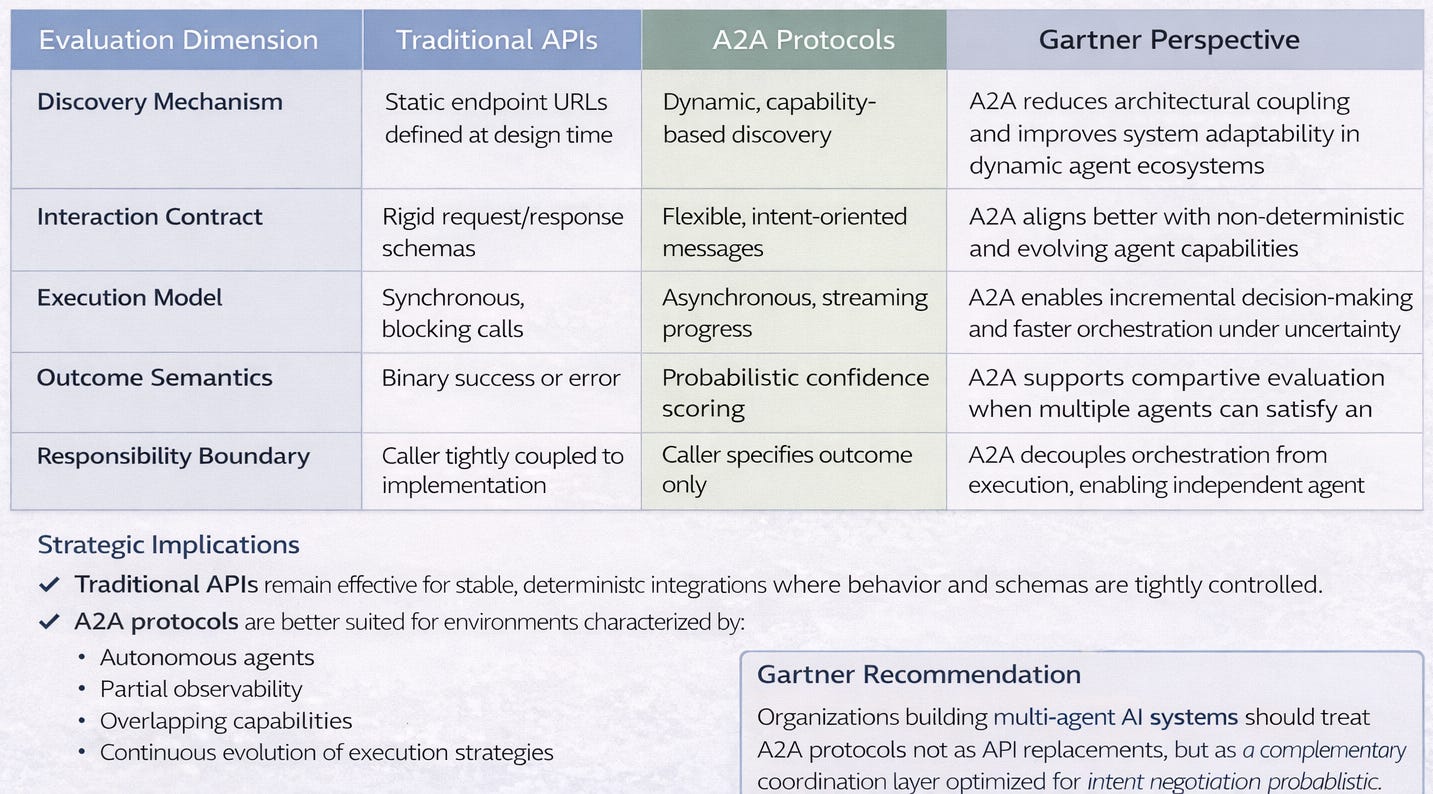
Traditional APl’s vs A2A Protocols
As Al systems transition from deterministic integrations to autonomous, multi-agent architectures, traditional API interaction models show structural limitations, Agent-to-Agent (A2A) protocols introduce intent-driven, probabilistic coordination better aligned with emergent agent behavior.
Use Case Example
A research coordinator agent needs comprehensive market analysis:
Step 1: The coordinator broadcasts intent: “Analyze market trends for renewable energy sector”
Step 2: Specialist agents respond:
Data collection agent: “I can gather news articles and reports” (confidence: 0.9)
Analysis agent: “I can identify patterns and trends” (confidence: 0.8)
Visualization agent: “I can create charts and summaries” (confidence: 0.7)
Step 3: The coordinator chains delegation: Data → Analysis → Visualization
Step 4: Each specialist uses MCP to access their tools (search APIs, databases, charting services)
Step 5: Results stream back through the delegation chain
Step 6: The coordinator receives the comprehensive analysis
Why Intent Matters: The coordinator doesn’t need to know how data collection works; whether it uses web scraping, API calls, or database queries. Specialists can use different methods for the same intent. New specialists can join without changing coordinator code. Failed specialists can be replaced without workflow redesign.
Decision Framework: When to Use A2A
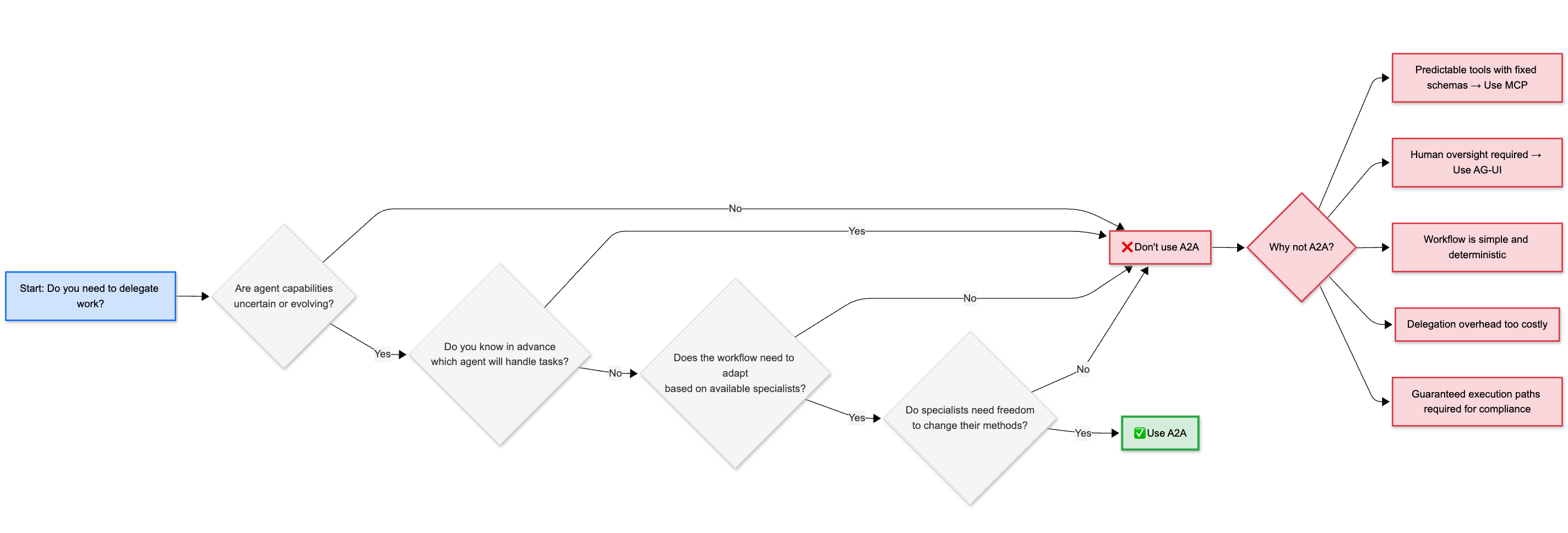
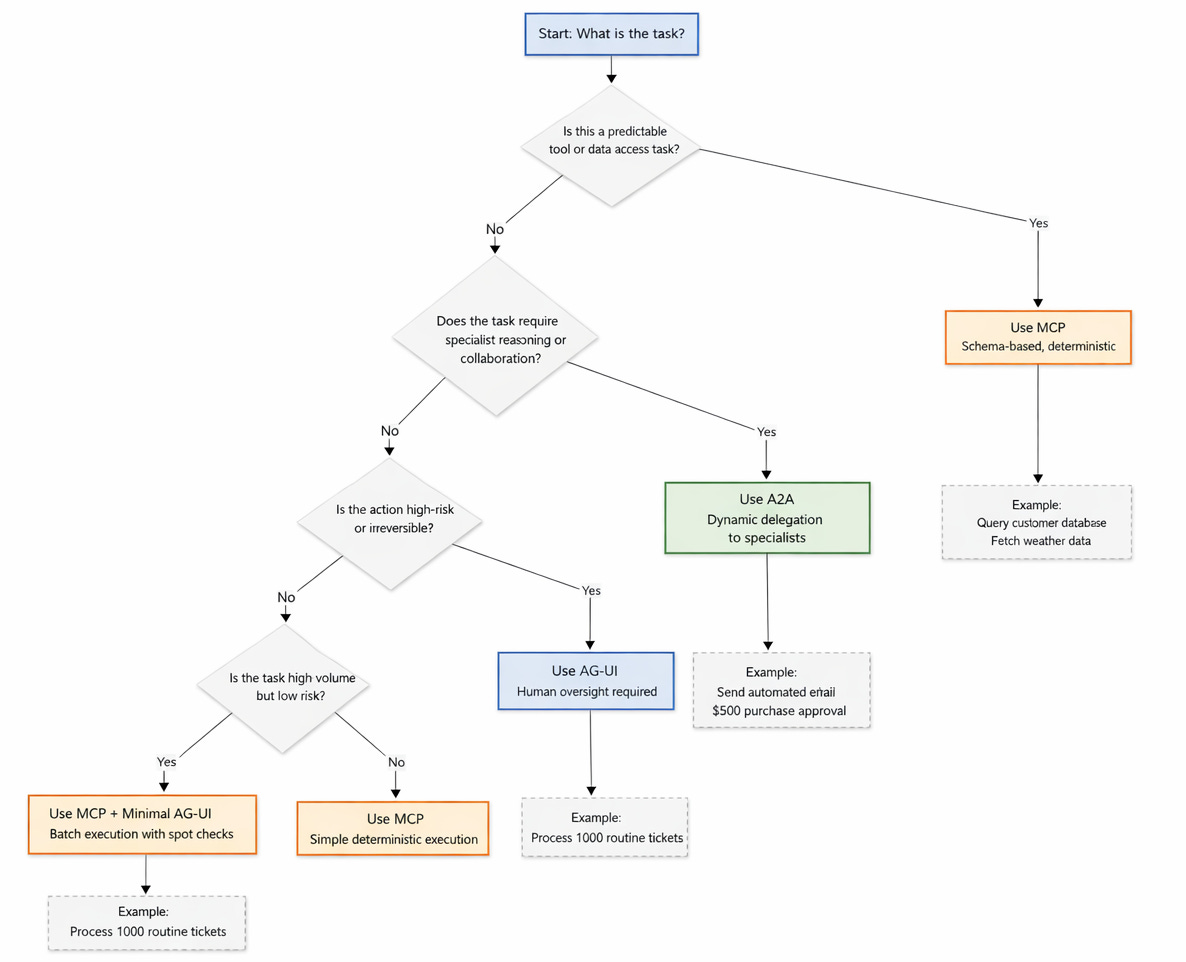
Consider This: Should your agent use A2A to delegate to a specialist, or MCP to directly call a tool? The answer depends on whether you know exactly what method to use (MCP) or need an expert to decide the approach (A2A).
Enjoying this deep-dive? Part 2 covers agentic commerce (ACP & AP2), agent experience design, and error handling patterns. Subscribe to get in touch

Subscribe here

it’s free, and I’ll never sell you anything.
Agent-User Interface (AG-UI): Building Trust Through Transparency
AG-UI transforms agents from black boxes into transparent collaborators by standardizing real-time visibility and control.
Core Components
1. Event Stream: A real-time feed of agent activities, decisions, and progress updates.
2. State Snapshots: Current progress, context being considered, and decisions being made.
3. Intervention Points: Specific moments where humans can pause, modify, or override agent actions.
4. Confidence Signals: Agent certainty scores about decisions, helping humans identify when oversight is needed.
5. Rollback Mechanisms: Undo capabilities for agent actions, allowing humans to reverse mistakes.
How It Works
Step 1: An agent begins a long-running task.
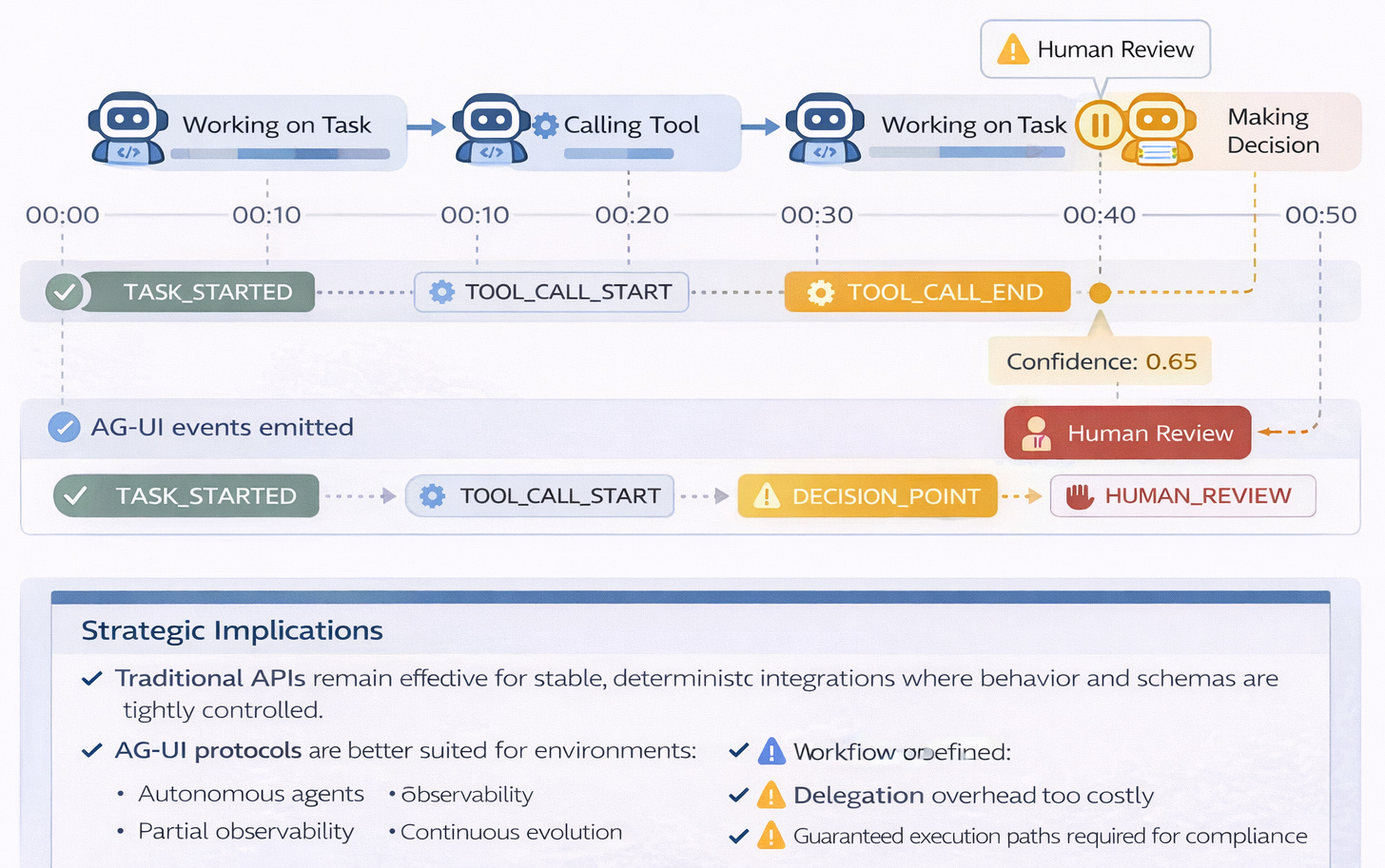
Step 2: The agent emits standardized events: TASK_STARTED, TOOL_CALLED, DECISION_MADE, and others.
Step 3: A user interface subscribes to the event stream and displays real-time updates.
Step 4: Humans monitor progress and see agent reasoning.
Step 5: At intervention points, humans can approve, reject, or modify agent actions.
Step 6: The agent continues or adjusts based on human input.
Step 7: The final result includes an audit trail of all decisions and interventions.
Standard Event Types
AG-UI defines common event types that agents emit during execution:
TASK_STARTED: Agent begins work, includes initial context and planned approach
TOOL_CALL_START: Agent about to use an external tool, shows which tool and why
TOOL_CALL_END: Tool returned a result, includes the data received
DELEGATION_REQUEST: Agent requesting help from another agent, explains reasoning
DECISION_POINT: Agent made a significant choice, includes confidence score
ERROR_ENCOUNTERED: Something failed, presents recovery options
HUMAN_INPUT_NEEDED: Agent paused, waiting for user decision or approval
TASK_COMPLETED: Final result ready, includes summary of what was accomplished
What Problems AG-UI Solves
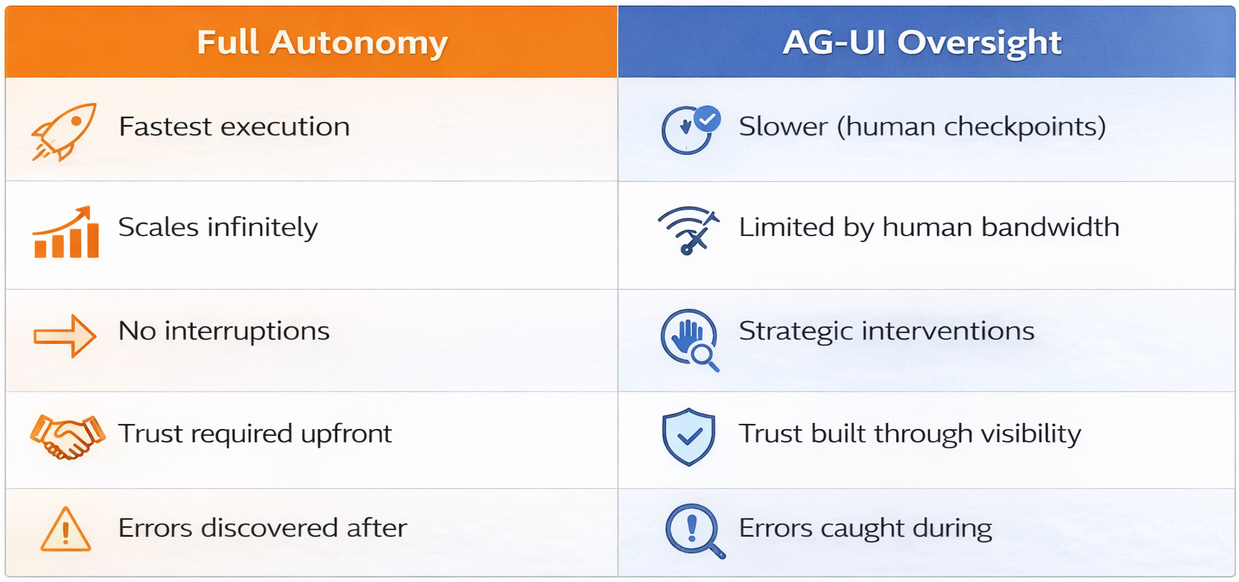
AG-UI builds trust by making agent reasoning visible, not just results. Humans see why agents make choices.
It enables intervention. Humans can catch errors before they cascade into larger problems.
It provides accountability. Audit trails show what the agent did, when, and why.
It reduces risk. Oversight prevents costly mistakes in high-stakes scenarios.
It facilitates learning. Humans understand agent decision patterns and can improve prompts or constraints.
What AG-UI Doesn’t Solve
AG-UI doesn’t make agents more capable. It only makes them more transparent.
It doesn’t eliminate errors. It just makes them catchable before they cause damage.
It doesn’t reduce complexity. In fact, it might increase cognitive load by exposing all agent activities.
It doesn’t work for fully autonomous scenarios. AG-UI requires human availability to monitor and intervene.
Use Case Example
An email management agent with AG-UI oversight:
Event 1: TASK_STARTED - “Processing 47 new emails”
Event 2: CLASSIFICATION_COMPLETE - “12 urgent, 28 normal, 7 spam”
Event 3: DECISION_POINT - “Draft response to customer complaint” (confidence: 0.65)
Human Action: The user sees low confidence, clicks to review the draft, notices the tone is too formal, edits to be more empathetic, approves send.
Event 4: ACTION_TAKEN - “Email sent with human modifications”
Learning Loop: The agent learns that low confidence + customer complaints = request human review before sending.
Why Transparency Matters
Agents aren’t perfect. Even 85% accuracy means 15% of actions are errors. Errors in automated actions—emails sent, payments made, data deleted—can’t be easily undone.
Humans trust what they can see and control. A black box agent that occasionally makes mistakes erodes trust quickly. A transparent agent that shows its reasoning and asks for help on uncertain decisions builds trust over time.
Intervention points let agents handle routine work while humans catch edge cases. This hybrid approach combines agent efficiency with human judgment.
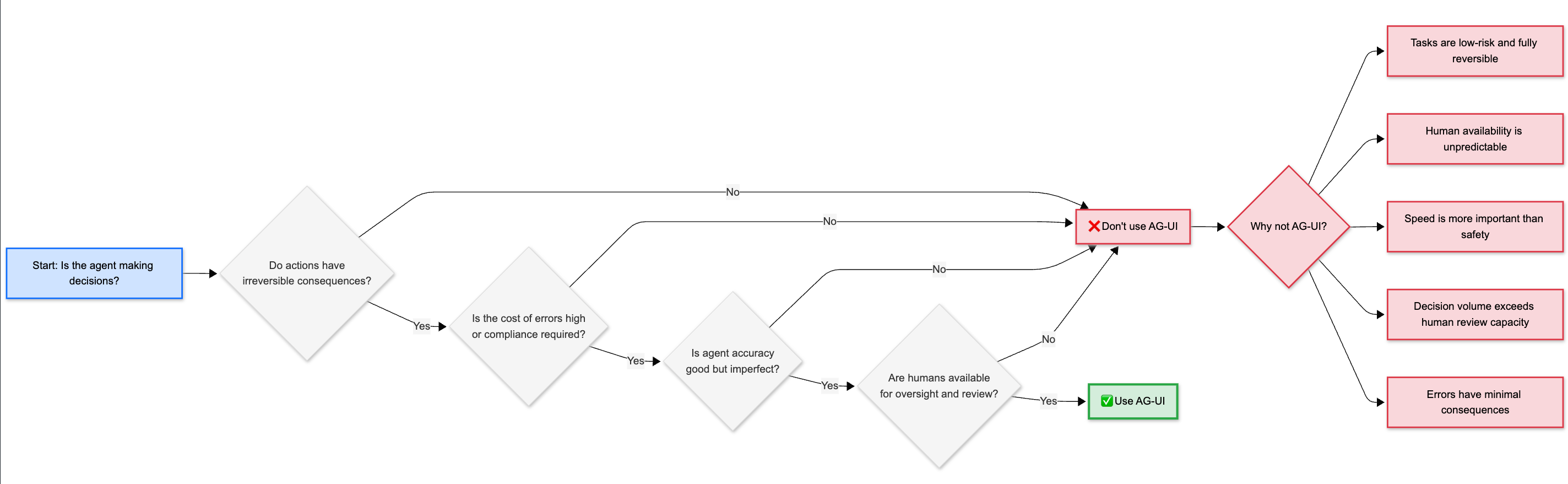
Ask Yourself: Which of your agent tasks truly need human oversight? High-stakes decisions with irreversible consequences require AG-UI. Routine, low-risk tasks might run autonomously. The key is identifying the right threshold.
Integration: How These Protocols Work Together
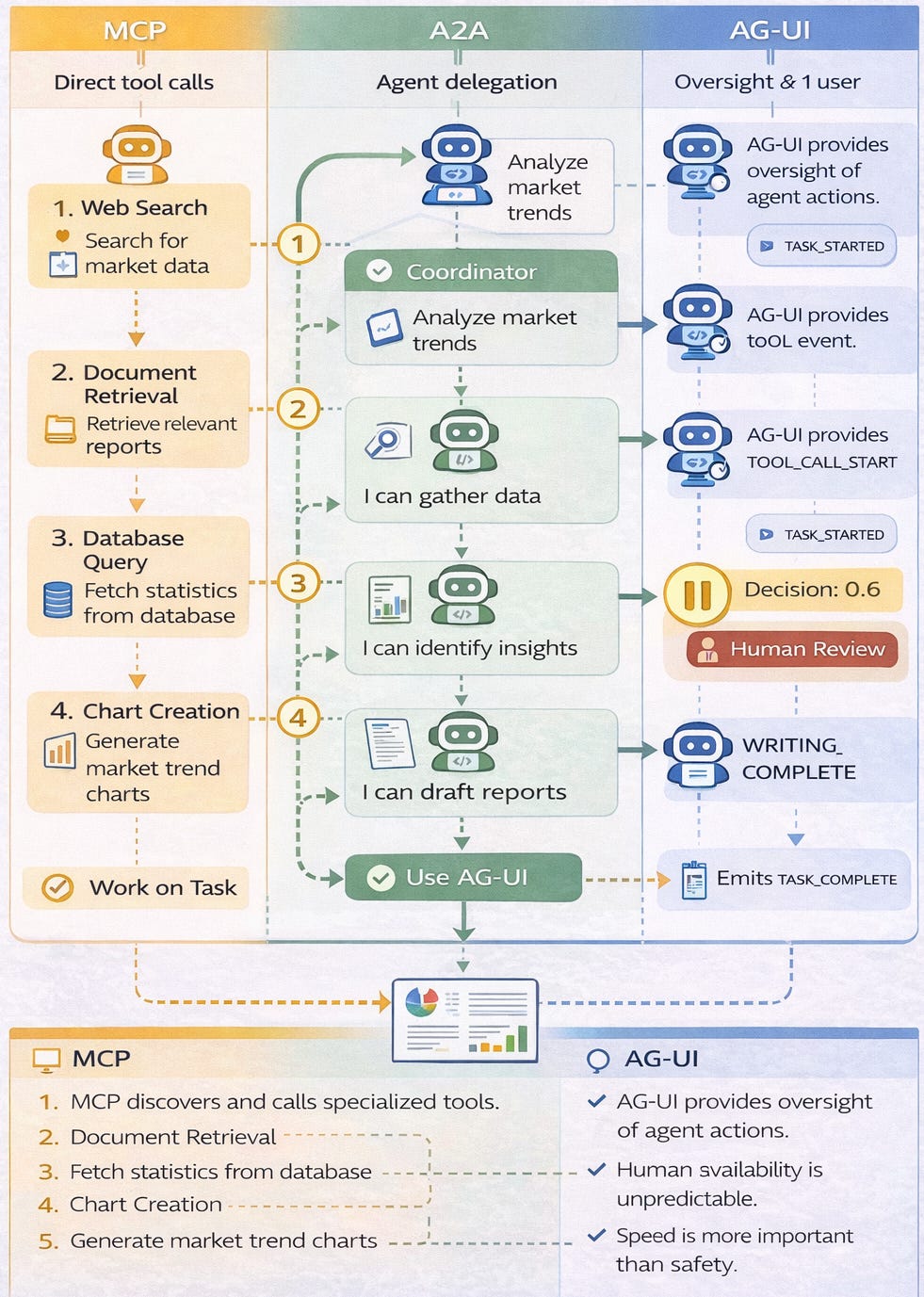
Effective multi-agent systems use all three protocols in combination, each solving a distinct coordination layer.
Let’s examine an automated research and report generation system to see how MCP, A2A, and AG-UI work together.
Layer 1: Tool Access (MCP)
The system has five MCP servers providing standardized access to external capabilities:
Web Search Server: Queries search engines, returns ranked results
Document Retrieval Server: Fetches PDFs, articles, and web pages
Database Server: Accesses internal knowledge base
Chart Generation Server: Creates visualizations from data
Export Server: Formats final reports in various file types
Layer 2: Agent Collaboration (A2A)
Six specialized agents coordinate via A2A protocol:
Coordinator Agent: Receives user requests, orchestrates the workflow
Research Agent: Gathers information via MCP web search and document retrieval
Analysis Agent: Identifies patterns via MCP database queries
Writing Agent: Synthesizes findings into prose
Visualization Agent: Creates charts via MCP chart generation server
Quality Agent: Reviews output for accuracy and coherence
Layer 3: Human Oversight (AG-UI)
The user interface displays:
Real-time event stream showing agent progress
Intervention point 1: Review research sources before analysis begins
Intervention point 2: Approve key findings before writing starts
Intervention point 3: Review final report before delivery
Confidence signals on uncertain claims
Rollback option if analysis went the wrong direction
Complete Workflow Integration
User Request: “Analyze renewable energy market trends Q4 2024”
Step 1 - Coordination:
Coordinator Agent broadcasts research intent via A2A
AG-UI Event:
TASK_STARTED, displays delegation plan to user
Step 2 - Research:
Research Agent selected, begins gathering sources
Uses MCP web search server to find articles
Uses MCP document retrieval server to fetch full texts
AG-UI Events:
TOOL_CALL_STARTandTOOL_CALL_ENDfor each MCP callAG-UI Event:
DECISION_POINT- “Found 47 sources, selecting top 15” (confidence: 0.82)Human reviews source list, approves selection
Step 3 - Analysis:
Analysis Agent receives sources via A2A
Uses MCP database server to compare with historical data
Streams findings back to Coordinator via A2A
AG-UI Event:
DECISION_POINT- “Key trend: Solar costs down 23%” (confidence: 0.91)High confidence, no human intervention needed
Step 4 - Writing:
Writing Agent receives findings via A2A
Generates report sections
AG-UI Event:
DRAFT_COMPLETE- Shows preview to userHuman reviews tone and structure, approves
Step 5 - Visualization:
Visualization Agent creates charts
Uses MCP chart generation server
AG-UI Event:
TOOL_CALL_START- “Creating cost trend chart”Returns completed charts to Coordinator via A2A
Step 6 - Quality Review:
Quality Agent checks citations, coherence, accuracy
AG-UI Event:
CONFIDENCE_SCORE- Overall report quality 0.88Human performs final approval before delivery
Step 7 - Delivery:
Report delivered to user
AG-UI shows complete audit trail: which agents did what, which tools were used, where human intervention occurred
Why This Three-Layer Approach Works
The MCP Layer standardizes access to diverse tools. Whether querying a search engine, fetching a PDF, or generating a chart, agents use the same protocol. When tools change, only the MCP server needs updating.
The A2A Layer enables flexible delegation without rigid workflows. The Coordinator doesn’t hard-code “first use Research Agent, then Analysis Agent.” It broadcasts intents and selects specialists based on capability matches. New agents can join the team without code changes.
The AG-UI Layer builds trust through transparency and strategic human oversight. Users see what’s happening in real-time. They intervene at critical decision points. They can roll back if needed. This combination of visibility and control makes users comfortable with agent autonomy.
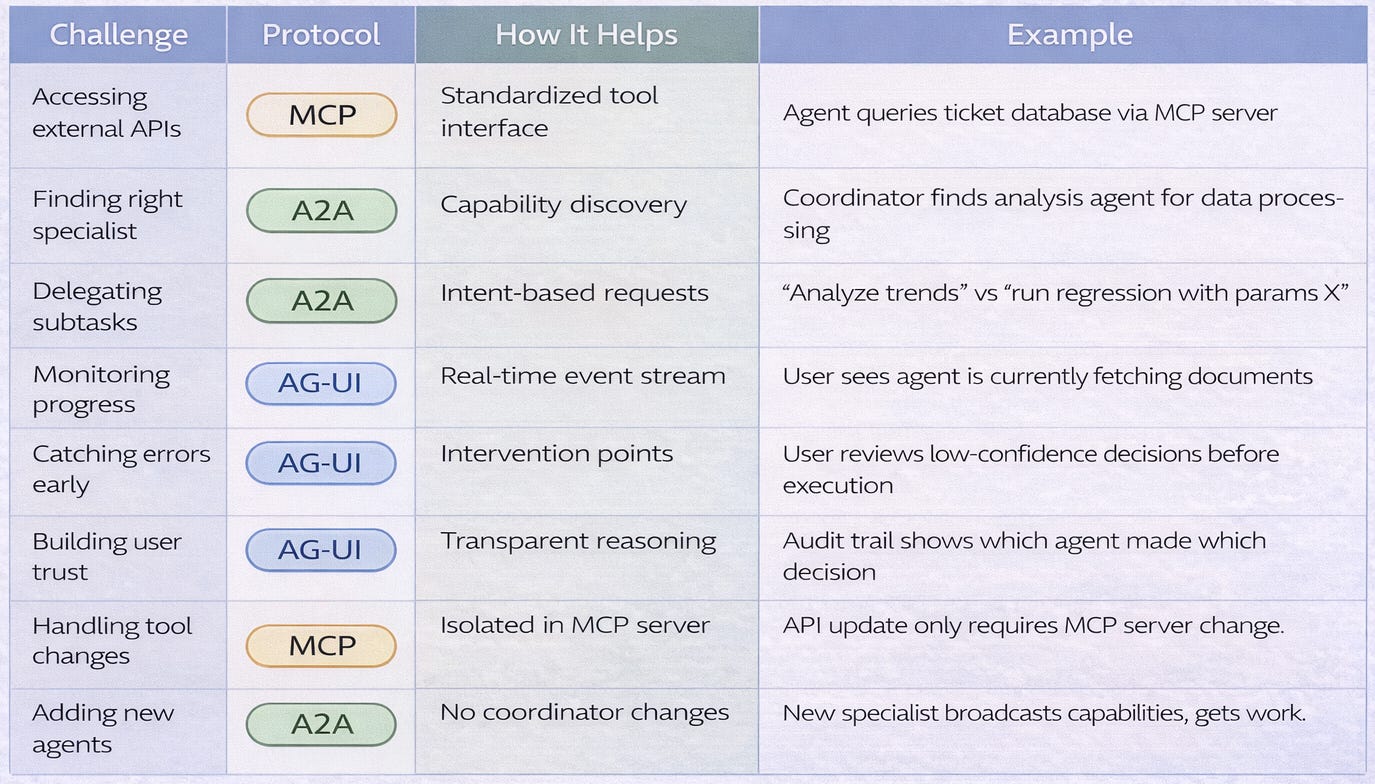
Key Takeaways
1 - Mental Model
2 - Decision Framework - when to use each protocol
What’s Not Covered Yet
Part 1 focused on the core protocols. Part 2 will explore:
Agentic commerce protocols (ACP and AP2): How agents transact securely
Agent Experience design (AX): Optimizing APIs for agent consumers
Error handling patterns: Circuit breakers, fallbacks, cost controls
What’s next: Emerging protocol evolution and ecosystem trends
What’s Next
Agentic Commerce (ACP & AP2): How agents conduct secure transactions
Agent Experience vs User Experience: Designing APIs for agent consumers
Error handling across protocol boundaries
The future of agent protocol ecosystems
Have questions about MCP, A2A, or AG-UI? Drop them in the comments and I’ll address the most common ones in Part 2.
Subscribe to The Neural Blueprint
By Vijendra
Deconstructing the architecture of modern AI systems